

A corporate billing car service consolidates chauffeured trips onto a single company invoice, so accounting stops chasing driver receipts and expense reports. The immediate next step is straightforward: request corporate onboarding from a chauffeur provider, submit your company details, and get authorized bookers active before your next travel-heavy month. Most accounts activate promptly once verification clears.
TL;DR:
- Corporate billing services automatically tag trips to the correct cost centers at booking, ensuring accurate reporting and reducing reconciliation time.
- Payment options include credit card, ACH, or invoice, with established accounts typically switching to Net 30 after a clean billing history over several cycles.
- Procurement should verify driver classification, integration capabilities, and rate transparency before signing, avoiding reliance on verbal assurances.
- Account setup requires company registration, authorized bookers, traveler lists, and a suggested credit limit, with activation usually in about 48 hours.
- Trust in reliability and service consistency outweighs flashy features, emphasizing punctual pickups, dispute resolution speed, and dedicated account management.
Table of Contents
- What Is a Corporate Billing Car Service, Exactly?
- How Does Corporate Billing Work, Start to Finish?
- What Should Procurement Verify Before Signing?
- What Documents Do You Need to Open an Account?
- How Do You Run the Account After It’s Live?
- What Happens When a Billing Line Looks Wrong?
- How Secure Is Your Corporate Travel Data?
- Managing Billing Across Multiple Offices or Entities
- Can You Customize the Invoice Format?
- Why Reliability Beats Flashy Features in a Corporate Account
- Ascend in Motion Corporate Accounts: What We Offer
- Sources
- FAQ
What Is a Corporate Billing Car Service, Exactly?
Consolidated invoicing means every ride, from an LAX pickup to a multi-day executive itinerary, gets logged against a company account instead of an employee’s personal card. At the end of the billing cycle, finance receives one invoice covering every trip, tagged by traveler, department, or cost center.
That structure solves three problems at once for finance, security, and budgeting teams.
- Reconciliation speed. No more matching forty individual Uber receipts to expense reports. One line item, one approval, done.
- Duty of care. Travel and security teams can see who traveled where, with a timestamped record tied to a real chauffeur, not an anonymous rideshare log.
- Spend predictability. Negotiated rate cards mean finance knows the airport transfer cost before the trip happens, not after a surge-pricing surprise.
Chauffeur services also differ meaningfully from rideshare corporate apps. A scheduled chauffeur guarantees a specific vehicle class, honors waiting-time policies for delayed flights, and allows flexible added stops. Rideshare apps optimize for driver availability, not reliability guarantees, which matters when a board member’s flight lands two hours late and the meeting cannot slip.
Pro Tip: If your company runs quarterly board travel, ask any prospective provider for their average on-time pickup rate before signing. A verbal promise means nothing without a number attached to it.
How Does Corporate Billing Work, Start to Finish?
Setting up the account is the easy part. Understanding what happens between booking and invoice is where most travel managers get surprised later.
- Account record creation. The provider builds a profile with your account code, list of authorized bookers, traveler roster, and cost-center structure.
- Trip booking and tagging. Each ride gets tagged automatically to the right cost center at the time of booking, not reconstructed afterward.
- Invoice run. On a fixed monthly close date, the provider generates a consolidated PDF invoice plus a CSV trip log, grouped by cost center, with tax lines applied where relevant, then emails both to your AP inbox.
- Payment processing. Your company settles via the agreed method on the agreed terms.
Payment defaults vary by provider, but the market pattern is consistent:
| Payment Method | Typical Terms | Best Fit |
|---|---|---|
| Card-on-file | Charged monthly on statement | New accounts, low volume |
| ACH / Direct Debit | Net 14 for new clients | Mid-size programs wanting automation |
| Invoice (Net 30) | Net 30 for established clients | Established accounts with credit history |
New companies typically start on Net 14 or card-on-file until payment history builds trust, then graduate to Net 30 invoicing. Providers often run a light credit check before setting an opening limit, and that limit tends to widen automatically once a few clean billing cycles pass.
What Should Procurement Verify Before Signing?
Procurement officers evaluating ground transportation vendors in 2026 face a tighter set of filters than a few years ago. RFPs now treat chauffeur classification, technology integration, and pricing transparency as baseline requirements, not nice-to-haves.
- Chauffeur classification. Ask whether drivers are W-2 employees or 1099 contractors. W-2 status is now a non-negotiable filter in most corporate RFPs, since misclassified contractors expose your company to co-employment and liability risk.
- Documentation on request. Ask for a sample Certificate of Insurance, a completed W-9, and, where possible, a sample payroll register to confirm classification practices before you rely on them.
- Booking-tool integration. Confirm whether the provider connects to tools like SAP Concur Direct Connect, Amex GBT, Egencia, or Spotnana, and whether trip data flows into your existing reporting without manual entry.
- Rate-card discipline. Request the published rate card, cancellation policy, and waiting-time rules in writing rather than relying on a verbal quote from a sales call.
Pro Tip: Do not accept a vendor’s word that integration “works fine.” Run one pilot booking through your actual TMC workflow before rollout. It takes a day and saves a quarter of headaches. This mirrors what procurement teams increasingly test directly rather than trust in vendor claims.
What Documents Do You Need to Open an Account?
Most providers ask for a similar packet of information to activate a corporate account. Gathering it in advance shortens onboarding considerably.
- Company registration details. Legal business name, registration number, billing address, and VAT or tax identification number if your entity requires one.
- AP contact and preferences. A named accounts-payable contact, preferred invoice format (PDF plus CSV is standard), payment terms, and whether purchase orders are required per trip.
- Booker and traveler lists. Names and emails of staff authorized to book rides, plus a traveler roster, ideally submitted as a CSV import rather than typed one by one.
- Cost-center structure. A list of departments or projects trips should be tagged against for internal reporting.
- Credit and fallback settings. A suggested opening credit limit, often set around twice expected monthly spend to avoid early payment friction, plus a card-on-file backup for any trip that exceeds it.
Once submitted, verified business accounts frequently activate within roughly 48 hours, assuming documentation is complete on the first pass.
How Do You Run the Account After It’s Live?
Activation is day one, not the finish line. The accounts that stay clean long-term have a light operating rhythm behind them.
- Request monthly CSV exports tagged by cost center so AP can reconcile without manual sorting.
- Set a monthly review cadence covering trip volume, spend per cost center, and on-time pickup rate.
- Assign a single internal owner who fields booking questions, rather than letting five departments book independently with no oversight.
- Ask the provider for a dedicated account manager, since last-minute schedule changes and group coordination move faster with one point of contact instead of a general call center.
Pro Tip: Before rolling the account out company-wide, run a small pilot of four to six test bookings. It confirms both service reliability and whether the monthly invoice export actually matches what was booked.
Communicate the approved booking channel clearly during rollout. Nothing undermines a new account faster than half the office still expensing rideshare rides out of habit while the corporate account sits half-used.
What Happens When a Billing Line Looks Wrong?
Billing disputes happen, even with clean systems, so the process for resolving them matters as much as the invoice format itself.
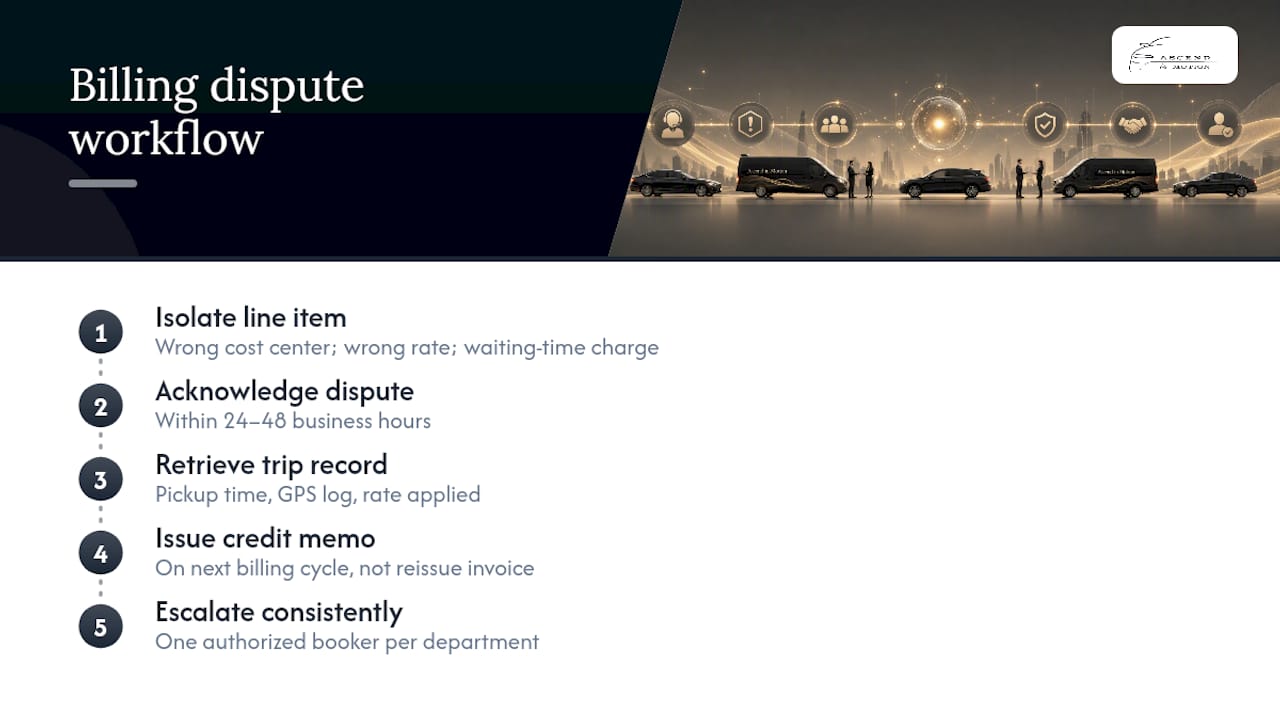
Start by flagging the specific line item, not the whole invoice. Most disputes trace to one of three causes: a trip logged under the wrong cost center, a rate applied outside the negotiated card, or a waiting-time charge the traveler disputes. Isolating the exact line speeds resolution considerably compared to a vague “this invoice looks off” email.
A reasonable provider response includes a documented process: acknowledge the dispute within a set window, typically 24 to 48 business hours, pull the trip record (pickup time, GPS log, rate applied), and issue a credit memo on the next cycle rather than reissuing the whole invoice. Ask providers upfront how they handle this before you need it, not after.
Keep a simple internal log of disputes and resolutions. If the same error type repeats, say waiting-time charges getting misapplied, that is a signal to revisit the rate card language with the provider rather than keep disputing individual trips one at a time.
One practical habit: designate one authorized booker per department as the point of contact for dispute escalation. Splitting that responsibility across many people means disputes get raised inconsistently, and small billing errors compound across months before anyone notices the pattern.
How Secure Is Your Corporate Travel Data?
A corporate account holds more than payment information. It carries traveler names, itineraries, pickup addresses, and often executive travel patterns, which makes it a meaningful data-privacy surface, not just a billing convenience.
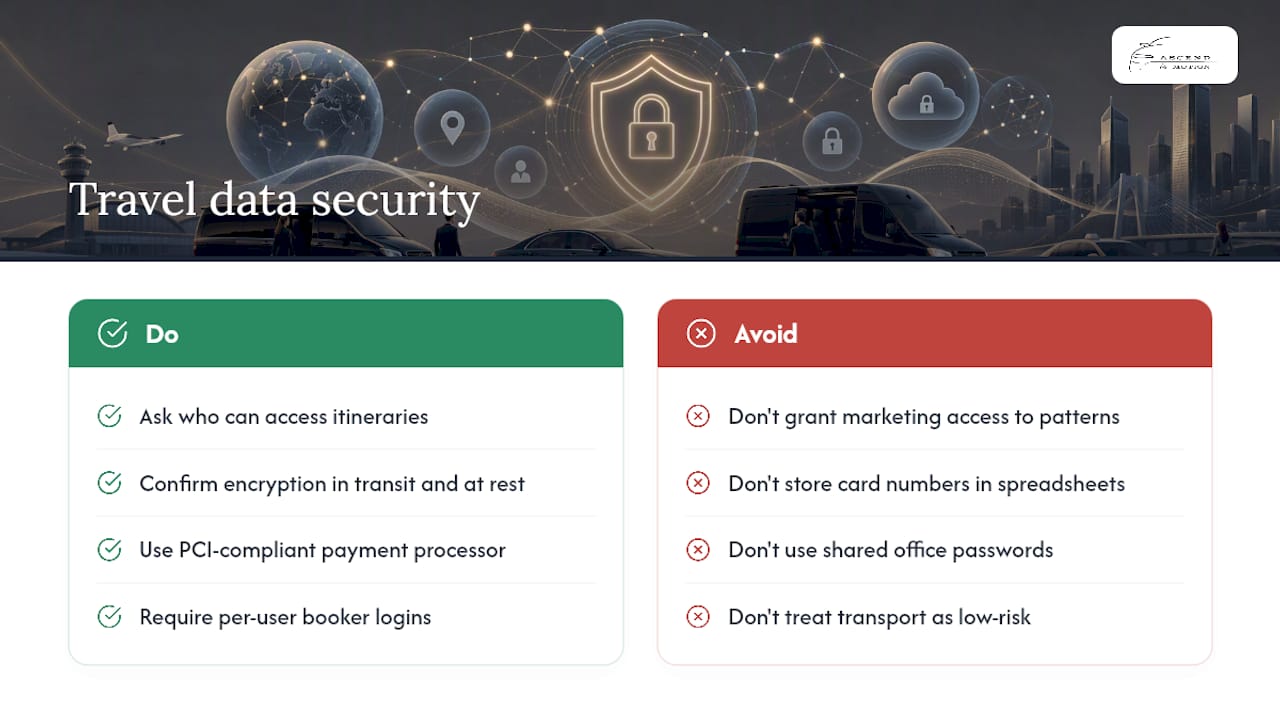
Ask any provider how traveler data is stored and who inside their organization can access itineraries. Dispatch staff needing pickup details is normal; a marketing team having access to executive travel patterns is not. Confirm whether data is encrypted in transit and at rest, and whether the provider retains trip history indefinitely or on a defined schedule.
Payment data deserves separate scrutiny. Card-on-file setups should run through a PCI-compliant payment processor rather than storing card numbers in a spreadsheet or shared inbox, a surprisingly common shortcut among smaller operators. If your company has internal data-handling policies for vendors touching personal information, add ground transportation to that review rather than treating it as a low-risk category by default.
Multi-user access controls matter too. Authorized bookers should have login credentials tied to their own accounts, not a shared password passed around the office. That way, if someone leaves the company, removing their access is a single action instead of a company-wide password reset.
Finally, ask what happens to traveler data after an employee leaves or a contract ends. A provider with a clear data-retention and deletion policy is signaling operational maturity that extends beyond just the invoice.
Managing Billing Across Multiple Offices or Entities
Companies with more than one office, or more than one legal entity, need a billing structure that reflects that complexity instead of forcing every trip through one flat account.
The cleanest approach uses a parent account with sub-accounts underneath, one per office or entity. Each sub-account gets its own authorized bookers and cost centers, but invoices can still roll up to a single master statement for group-level visibility, or stay split for entities that file taxes separately. This matters particularly for companies with distinct VAT or tax registrations per entity, since combining them onto one invoice can create accounting headaches at tax time.
Traveler rosters should map to sub-accounts too. A booker in your Santa Monica office should not accidentally book against your San Diego entity’s cost center because the roster was never separated during setup. Ask the provider how sub-account permissions are enforced, not just whether the feature exists on paper.
For companies running frequent multi-entity travel, such as executives moving between a Los Angeles headquarters and a Palm Springs satellite office, consistent service quality across every pickup point matters as much as the billing structure itself. A provider that treats each office as a separate afterthought account, rather than part of one coordinated program, tends to produce inconsistent invoices and inconsistent service quality.
Can You Customize the Invoice Format?
Standard invoices work for many companies, but larger AP departments often need specific formatting to match their existing systems, and most established providers can accommodate reasonable requests.
Common customizations include adding purchase order numbers to each line item, splitting invoices by department instead of receiving one combined statement, or requesting trip-level detail fields beyond the basics, like project codes or approving-manager names. If your company uses a specific accounting platform, ask whether the CSV export can match your required column structure directly, which saves someone in AP from manually reformatting every month.
Tax handling on invoices deserves a direct conversation too. If your company operates across jurisdictions with different tax treatment, confirm how the provider applies tax lines and whether documentation supports your specific filing requirements. Do not assume a generic invoice template covers your situation correctly.
The realistic limit on customization is operational, not technical. A provider can usually add fields or split reports; what they cannot easily do is rebuild their entire invoicing system around one client’s unique format. Ask early in the onboarding conversation what is standard, what is a reasonable add-on, and what would require a custom build, so expectations are set before your first billing cycle rather than after a frustrated finance team calls asking why the invoice doesn’t match what was promised.
Why Reliability Beats Flashy Features in a Corporate Account
Most vendor pitches lead with technology. Fewer lead with the boring stuff that actually determines whether your finance team has a good quarter or a miserable one: whether the invoice arrives on the same date every month, whether the chauffeur shows up when the flight actually lands versus when it was scheduled to land, and whether a dispute gets resolved in two days or two weeks.
I’d argue the RFP shift toward requiring W-2 classification and rate-card discipline reflects something procurement teams learned the hard way: a low quote from an unverified operator often costs more in cleanup than a slightly higher rate from a stable one. A single point of contact who knows your account, rather than a rotating call center, is worth more than most feature checklists suggest on paper.
— Sirus
Ascend in Motion Corporate Accounts: What We Offer
Ascend in Motion runs corporate billing accounts built for exactly the workflow this article describes: consolidated monthly invoicing with an itemized CSV trip log, authorized booker management, and flat-rate pricing on LAX airport transfers so finance never has to guess at a fare. Groups traveling together can book a business van or business minibus under the same account, with invoicing formatted for AP teams rather than retrofitted from a consumer receipt.
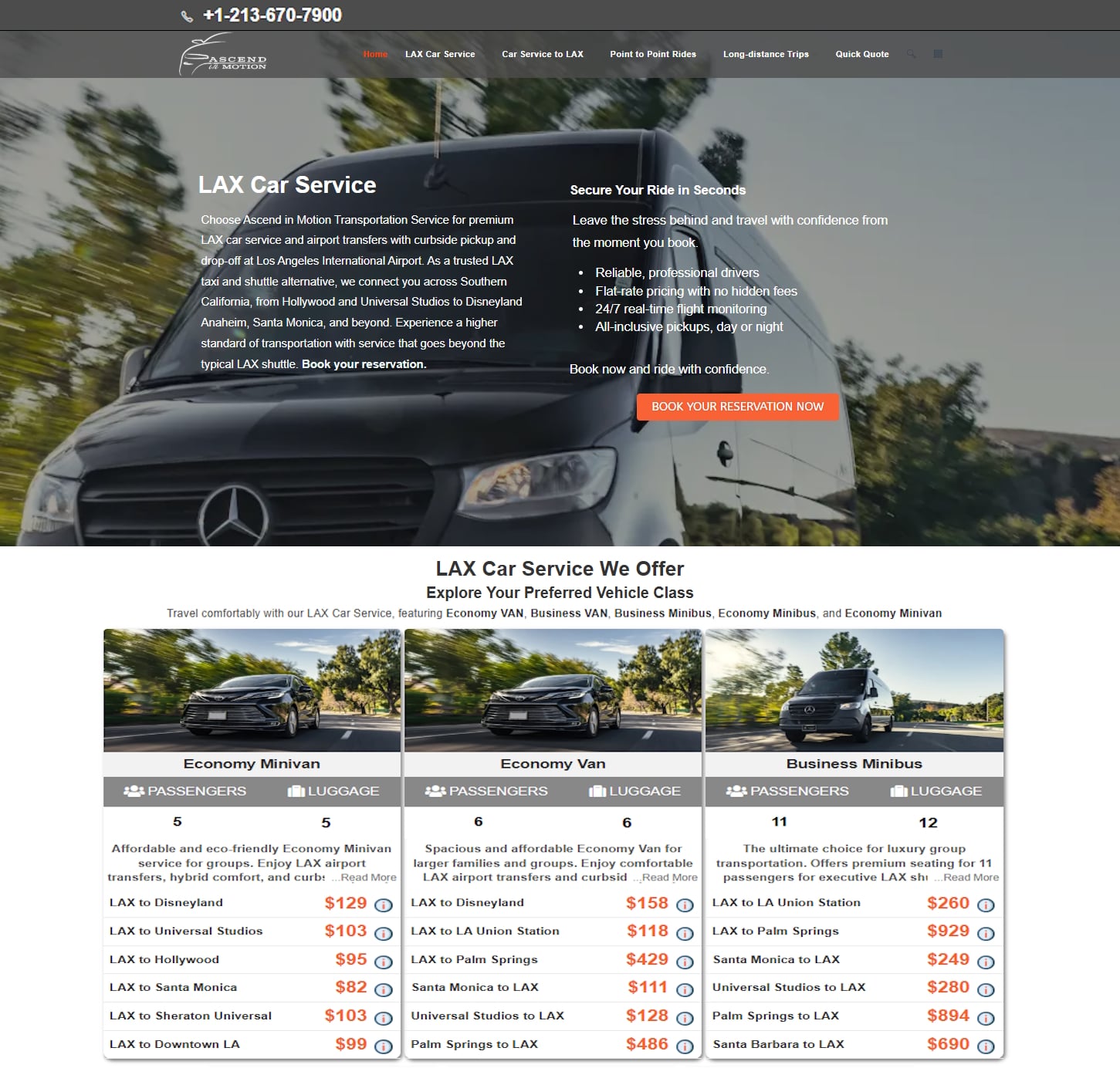
Vehicles used for service typically include black minivans or Mercedes-Benz Sprinters kept unbranded except on designated service vehicles, providing discretion alongside reliability for executive travelers. If you are ready to move your team off personal-card expensing and onto a single corporate invoice, request onboarding through our luxury airport car service page or schedule a pilot booking to test the process before rolling it out company-wide.
Sources
For deeper procurement and setup guidance, review the 2026 corporate travel RFP guide for classification and integration standards, the corporate account setup and invoicing walkthrough for payment terms, and this corporate transportation account guide for onboarding documentation. Procurement teams comparing feature sets across operators can also review this corporate accounts services page as a reference point.
- Corporate travel RFP guide 2026 (Business Class Journal)
- How to set up corporate accounts & monthly invoicing (Taxi Web Design)
- How to set up a corporate transportation account | Larry’s Limo
- The benefits of using a professional chauffeur service (BCD Travel)
FAQ
What Documents Do I Need to Open a Corporate Account?
You typically need your company registration number, billing address, tax or VAT number if applicable, an AP contact, and a list of authorized bookers, ideally submitted as a CSV for faster import.
How Long Does Corporate Account Activation Take?
Verified business accounts often activate within about 48 hours once documentation is complete, though new accounts may start on card-on-file or Net 14 terms before graduating to Net 30.
Is W-2 Chauffeur Classification Really That Important?
Yes. W-2 classification is now treated as a non-negotiable filter in corporate RFPs because 1099 misclassification can expose your company to liability and co-employment risk.
Can Ascend in Motion Integrate With Our Existing Booking Tools?
Ascend in Motion supports authorized booker management and itemized CSV exports designed for AP reconciliation; ask your account contact about your specific booking-tool integration needs during onboarding.
What If We Have Offices in Multiple Cities?
Multi-entity accounts should run through sub-accounts with separate cost centers and traveler rosters per office, rolling up to one master invoice or staying split for entities with separate tax filings.

